Saturday, 6 May 2017

Believe in Yourself for Imagine Design Create

Hello crafters, Have a look at step by step how to made this lovely card using Reach for the star stamp set by Imagine Design Create .
1. Use watercolour card (I work on  A4 size so I can always choose the part of the card that I need for a particular project and in the same time I have some readymade background left for the next sample).  Sprinkle randomly your chosen brusho powders and spray with water. Use as much water as you need to achieve the desired look.  Your creation will be unique each time.

2. Cut the background  an inch smaller than A5 card, leaving the remaining inch for black and gold matting cards.

3. Use silver gold Starlight paint with a stencil. In this project I used Mini Orion stencil by Imagination Crafts.  Stipple the paint through, using a  big, round brush.

4. Use distress ink -seedless preserve- to add colour to the edges.

5. Stamp the main IDC sentiment and stars stamp.


6. Mat and layer ready background onto the black card and then onto the gold mirri card to create a frame. 


Have a great weekend.

Kasia 

Saturday, 1 April 2017

Imagine Design Create -New DT

Hey there crafters,

I am happy to announce that I have just started a new adventure with Imagine Design Create.
 http://www.imaginedesigncreate.co.uk/

I am a new Design Team Member and I did not waste anytime and decided to crack on with crafting.
For my first IDC blog  entry I used Gorjuss stamp set.  I never worked with gorjuss stamps only because I always thought the colours are a bit gloomy and depressing.
For my project I created a journal page reflecting how I feel today when sun is shinning and birds are singing....

Here we go ...

This is what I ended up with...

1. I used Sparkle pens in coordinating shades so I could blend them. I applied all three different shades and used damp brush to blend the colours, with stroking movement  from right to left and back  


2. I stamped, coloured and cut out the Gorjuss stamp. I used my distress ink with combination of Dual-Tip watercolour pens by Santoro.

3. Firstly I used bauble stencil and spray white spritzing ink over the blue part of the paper. I used paper die cut to create the squares pattern in random places, using a distress ink with dubber.


4. I randomly splatter the silver gold stalight paint by Imagination Craft and stamped dragonflies.
I also use Leonie Pujol border stamps on the edges.

5. I used heart stamps from the Gorjuss set and the sentiment that was matted and layered onto the black card before adhering it on the page with foam tape.


6. Finally I used foam tape to adhere the main image and added some extra cut out cards.


All the products used in this project are available from 

Products used:

1. Versafine Onyx Black Ink
2.Gorjuss stamps by Santoro 
3. Distress inks
6.Leonie Pujol stamps


Any questions or comments leave below please....

Happy Saturday

Kasia 
Happy Saturday,

Let me introduce some of my samples for today's launch of new Hunkydory-For the Love of Stamps'.

As usual had so much fun with all the sets and tried to come up with different techniques.


I enjoyed this prickly set. I used a craft card for background. I used distress and the stencil  to create cactus background.

I stamped and cut out some plants, for colouring most of stamps I used distress inks along my kuretake brush pens.

Mat and lay onto the black panel.

I used foam pads to lift the plants.


Same technique with stamping and cutting out a coloured plants. For the background I used distress inks and stencil to add edges and details.

I adore this sentiment.


 Balloons...

Randomly stamped the balloons and coloured. I used distress ink to colour edges .

You might not see it on the photo but I used mica spray for shimmer effect.


On this card I used heart balloons and stamped part of sentiment on each.
Used the stencil to create the cake in the background.

The central circle is  mattted and layered onto the gold mirri card.


I wanted to used stamps without colouring. I used coordinating stencil to create the background and celebrate word.


Hope you like my samples and watch the space for more to come.

hugs 

Kasia

Tuesday, 21 March 2017

Butterfly Love

Hi everybody,

I just have to share with you my latest passion for the butterfly stamp set from Concord & 9th,


available from https://www.bumbleberrys.co.uk/
Butterly beauty set from Concord &9th


Look at this stamp set... what a fantastic design!


I tried to use the big butterfly stamps as the main focus on the card. I have used the brusho background since I have made so many A4 sheets the other week.


Thank you card on the brusho background. I used the foam pads to give butterflies a lift and dimension.


Happy Birthday card, I used the brusho background, Stamped and cut out the butterfly. I spray lightly water on the back of butterfly to soften the paper so I could shape it. It really makes a different.
In this card I heat embossed the butterfly, I used the clear embossing powder so the butterflies just have a soft shine. I cut two big ones and two small ones.
I have arranged the butterflies on the card and used foam pads for dimension.


In this one I stamped the butterflies on the separate card and used distress ink to colour them.


Coloured butterflies
I splashed gold starlights paint on the craft card backgroung.


 I also used the small butterflies stamps to create the bookmark.  I used distress inks for background.


I am sure you will love this set as much as me. There is SO much more to do with this set...

Thank you for reading,

Hugs,

Kasia

Monday, 20 February 2017

Avery Elle stamps


   New Avery Elle stamps
I have became a part of design team for Bumbleberry papercrafts.
The shop has a fantastic variety of craft products including Avery Elle stamps. This is my first time working with these stamps and I am already in love with the quality. They stamp effortlessly, no pressure needed.  


https://www.bumbleberrys.co.uk/


Punny Pantry Clear StampsThe cards below were made using this stamp set.

I have started with stamping I must apple-ogize stamp on the white card. The stamping was so addicting that I had to cover the whole card with random apples.

I stamp one apple on the separate card, cut out and colour red.

I use distress inks and water brush to colour my apples, i love this kind of colouring as it is giving me control over shading.

I use yellow distress on the edges , I do the same on the small card for a red apple.

I add some little hearts to send some love with apologies.


I have used the same technique to create a similar card with another stamp from this set... You're my butter half!


All crafty supply you can get from:
 www.bumbleberrys.co.uk

Sunday, 29 January 2017

step by step tutorial - TAG


Hello there, happy Sunday !
I would like to present you my first step by step tutorial, it took some times to put pictures together but I think the instructions are  clear and easy to follow.  
step by step tutorial below:


You need:
-watercolor card
- brusho powders ( I used Yellow, Lemon, Orange and Leaf Green)
- big background stamp ( by imagination Craft)
- grey or black ink ( I used versafine)
- distress ink
- gold paint ( I used a starlight paint by Imagination Crafts)
- bauble stencil and stippling brush ( or sponge)
- black card for matting, ribbon ( optional) and double sided adhesive tape 


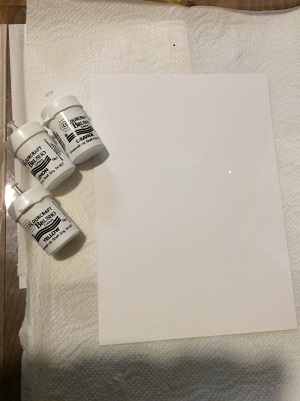
     Step 1: use watercolor paper and brusho powders in desired colours.
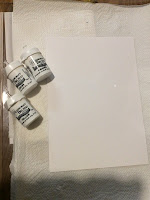
TIP: if you don’t have a watercolor card you can use regular card, brusho powder won’t ‘move around’ as on watercolor card but you still get an unique design.


   Step 2: sprinkle brusho powder onto the card


Step 3: spray the water onto the card


Step 4: keep adding water until you get the design want


Step 5: add a different  brusho powder ( optional)


Step 6: dried design will look a bit different from wet one. TIP: always work on bigger card than you need for your project, you can then cut out the piece of card you like.


Step 7: Cut the tag shape, simple cut the two top corners off. Stamp the side of the tag with big background stamp. TIP: you can use small stamps if you don’t have a one big stamp, I used grey ink as I did not want the sharp look. If you want the words to stand out a bit more use a black ink.

Step 8: I used a matching distress ink to create faded bauble pattern, the more random the better J


Step 9: Using the same bauble stencil I used gold starlight paint in random places again. Stippling brush is the best to use but if you don’t have one use a makeup sponge.


Step 10: use the same distress ink on edges


step 11: stamp the desired words on the separate card.  TIP: you can use any words stamp. Using single letter stamps allow to stamp any word you need.


Step 12: mat the tag on the black card and add cut out words


                                                   Add the ribbon if desired


Hope you enjoy my step by step tutorial.
Any question please leave the comments.

Happy crafting to you all...


Kasia


Find me on Facebook:

https://www.facebook.com/Handcrafted-by-Kasia-KC-LaCraft-580015498778303/

Saturday, 7 January 2017

DT samples 'For the love of stamps'

Hello everyobe and happy new year,

I just want to share with you some of the latest DT samples I made for today's launch of Hunkydory stamps.

There are on special offer on C&C now so it is the best time to get them.


Firstly cards with cross... my favorite from this collection. This one is stamped and coloured, matted on gold mirri cards.


My second cross is on the craft card. I stamped cross and used gold embossing powder. I coloured the cross with gold mica powder.
I love this card...
This card is butterfly card. I used distress inks to create the background and stamped with black ink.
 

Another butterfly card, this time on the craft card. 

Happy crafting, 
Kasia 

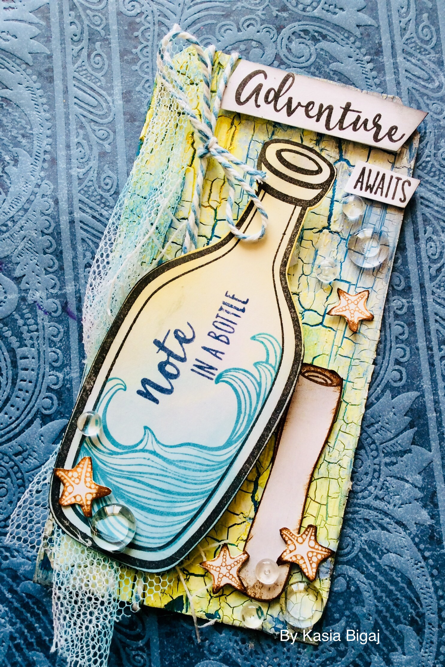
Honey Bee stamp - adventure awaits

Hello everyone, Today I have a step by step tutorial how I created this adventure await tag. I used the tim holtz mixed media tag...